Pulsa la lupa para activar el zoom. Mueve el ratón sobre la imagen.
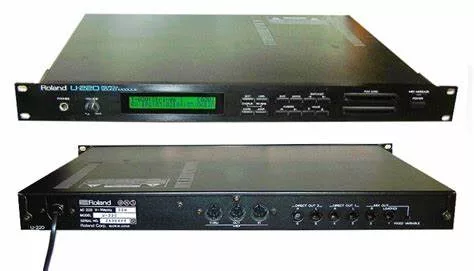
Sound Module
Roland - U220
200,00 €
28922, Alcorcón · Publicado: 2026-02-11 18:43:17
Modelo: U220
Fecha de Salida: 1991-07-07
Fecha de Creación: 2024-12-17 23:41:32
Descripción:
https://support.roland.com/hc/en-us/articles/201965009-U-220-Playing-the-Demo-Songs
U-220: Technical Specifications
2 years ago Updated
Spring 1992
POLYPHONY:
30
MULTITIMBRAL PARTS:
6 + Rhythm
SOUND SOURCE:
RS-PCM
EFFECTS:
Reverb, delay, chorus and flanger
INTERNAL MEMORY:
Patches: 64
Timbres: 128
Rhythm Setup (B2 to C7 61 notes): 4
PRESET MEMORY:
Preset Tones: 128
ROM CARD SLOTS:
2 - compatible with SN-U110 and SN-MV30-S1 Series
DISPLAY:
24 x 2 backlit LCD
OUTPUTS:
6 - 2 1/4" L/R + 2 sets of 1/4" L/R Direct
DIMENSIONS:
482(W) x 358(D) x 45(H) mm - 19"(W) X 14-1/8"(D) X 1-3/4"(H) - 1 rack space
WEIGHT:
4.4 kg - 9 lb 11 oz
Articles in this section
FANTOM-06, FANTOM-07, FANTOM-08: Register 1' does not work if Percussion is activated in the Virtual Tone Wheel Organ (VTW)
FANTOM-6, FANTOM-7, FANTOM-8: Register 1' does not work if Percussion is activated in the Virtual Tone Wheel Organ (VTW)
A-01: Activating Bluetooth Mode
A-01: Auto Off
A-01: Backing Up Your Settings
A-01: Changing the Auto-Off Setting
A-01: Factory Reset
A-01: LCD Contrast
A-220: Restoring the Factory Settings
A-30, A-33, A-37, AX-1, AX-7: Initializing and Restoring the Factory Settings
See more
U-220: Playing the Demo Songs
2 years ago Updated
Use the following procedure to play the demo songs in the U-220:
1. Press the DATA button.
2. CURSOR to "Utility" and press ENTER.
3. CURSOR to "ROM Play" press ENTER.
4. Use the CURSOR to select between the two songs.
5. Press ENTER to play.
Facebook Twitter LinkedIn
Was this article helpful?
4 out of 4 found this helpful
Need more help? Go Backstage
Recently viewed articles
U-220: Technical Specifications
U-220: Bulk Dump
U-220: Loading MIDI SysEx Data
DR-3: Technical Specifications
DR-3: Initializing - Restoring the Factory Settings